




A Complete Guide to Workforce Engagement Management Part 1

I’ve been spending quite a bit of time lately digging into Workforce Engagement Management, or WEM, in Dynamics 365 Contact Center, and I really feel that this part of D365 Contact Center hasn’t gotten enough attention! There are quite a few pieces to WEM, and while it can sound like a big, complicated topic at first, the basic idea behind WEM is actually pretty straightforward: how do we make sure we have the right amount of Customer Service Reps, with the right skills, available at the right time? WEM brings together capabilities for forecasting, capacity planning, scheduling, adherence, and more to help contact centers manage their workforce more effectively. There is a lot to cover on this topic so I’m going to break this down into a series of articles. In the first two articles, I’ll explain what WEM is, why it matters, and walk through the different capabilities that make up a workforce management process. Then, in the articles that follow, we’ll take a closer look at each capability and see how it works in Dynamics 365 Contact Center.
So, what exactly is WEM?
Before I start digging into the application, let me first explain what it is. Workforce Engagement Management is all about managing the people side of a contact center. Contact centers Managers need enough Customer Service Reps available to handle the expected volume of calls, chats, cases etc. They need to know when their CSRs are available to support customers, when they are taking breaks, when they have training scheduled, and when they are unavailable due to other reasons like internal meetings. On top of that they probably also want to know whether their CSRs are actually following their schedules and whether their staffing assumptions match what is really happening. WEM covers things like forecasting, capacity planning, scheduling, shift planning, time-off requests, adherence, and intraday performance. The goal here isn’t simply to create a schedule for your CSRs and be done with it, the whole idea is to create a continuous cycle where historical information helps us forecast future demand, those forecasts help us plan our staffing needs, those plans help us create schedules, and then actual performance can be compared back to the original plan. What this translates to in WEM is that we will upload historical data files (only if you’re not using historical data from D365 Contact Center), use that data to create forecasts, use the forecasts as a source to create capacity plans, and use those capacity plans to create shift plans.
Forecasting
If you’ve worked in a contact center before, terms like forecast, capacity planning, and shift planning probably sound pretty familiar. If you haven’t, they can sound like workforce management terminology that doesn’t immediately mean much to you, so let me explain what these things are so it’s easier to understand. A forecast is essentially our best estimate of how much work the contact center expects to receive in the future. For example, let’s say we have a customer service team that handles phone calls. Looking at our historical data, we might see that we usually receive around 500 calls on a Monday, but that number goes up to 700 calls on a Tuesday. We might also see that Mondays are particularly busy between 10:00 AM and noon. A forecast takes information like this and uses it to predict what we might see in the future. And it isn’t just about how many conversations or cases we expect. WEM can look at things like the channel, queue, interaction volume, and average handling time to help determine how much work is expected and how long that work might take. In simple terms a forecast answers the question “how much work is coming in the future”.
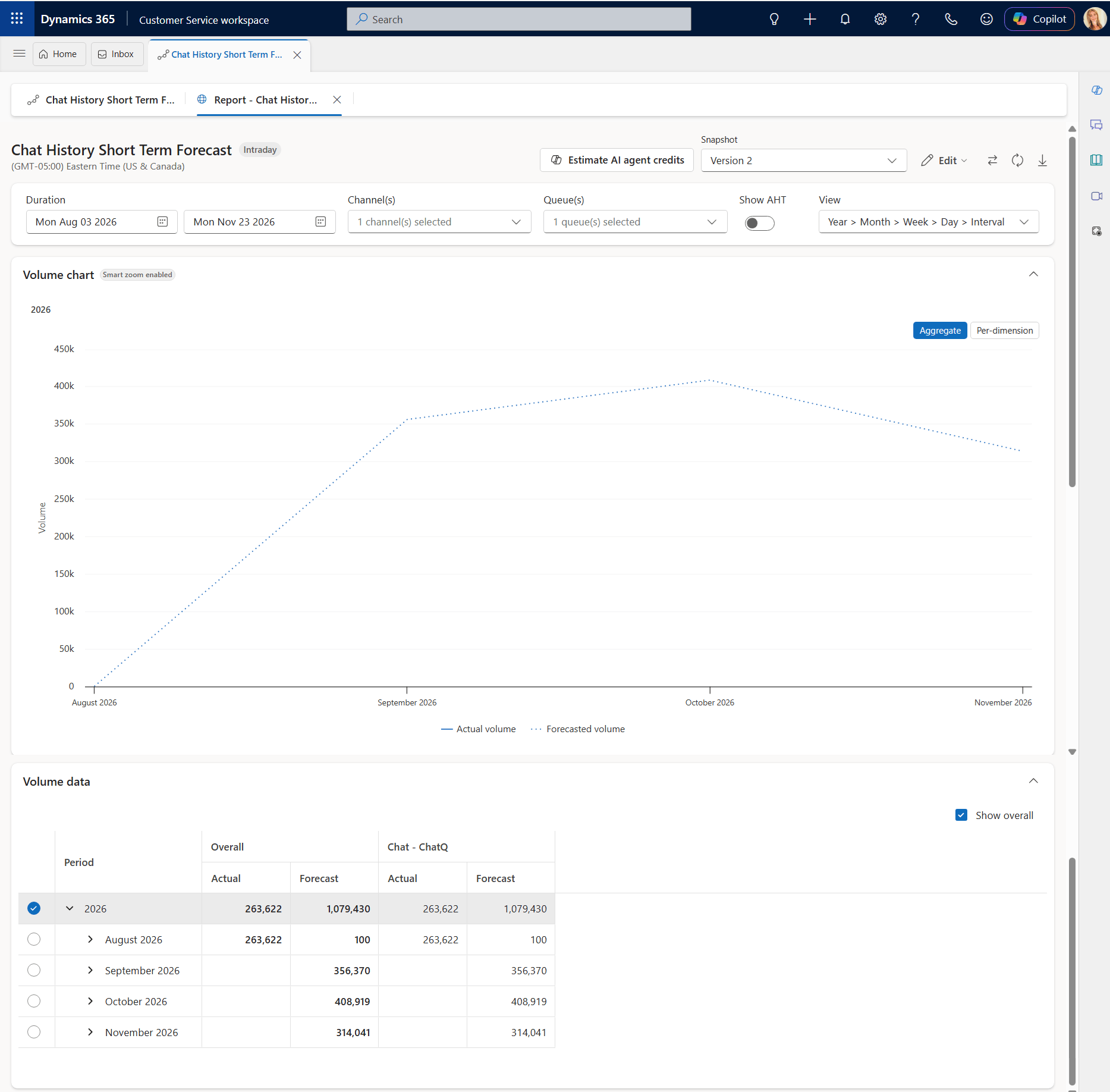
Before we can forecast anything, we need historical data that we can use as a source for the forecast. The better our historical data represents what actually happens in the contact center, the more useful it can be when creating our forecast. If you’re managing a contact center today, chances are there is a good amount of historical data available. It’s important to understand that data doesn’t have to come from Dynamics 365. Maybe your contact center is running on another platform, and all of your historical interaction data lives there. That doesn’t mean you need to build a complicated integration between the two systems just to get that history into WEM. Instead, you can export the historical data from your existing contact center, format it for WEM, and import it into Dynamics 365 Contact Center to use for forecasting. This makes it much easier to bring your existing history with you when you move to WEM, without having to connect the two systems together just for this purpose.
Another scenario is that your organization is already using D365 Contact Center (great news!). If that is the case, you can use the data from your existing environment as the starting point for the workforce forecasting and skip the data import step all together. This is especially helpful if you’ve been using Dynamics 365 Contact Center for a while and have built up a history of your interaction volume and handle times.
Capacity Planning
Now that we have an idea of how much work we expect through the forecast, we need to figure out how many people we need to handle that work. That’s where capacity planning comes in. Let’s say our forecast tells us that we expect 500 conversations on Monday. That doesn’t tell us how many representatives we need. We need to consider things like how long those conversations take (on average), how many CSRs are available, and how much of their time can actually be spent handling customer interactions vs attending internal meetings, trainings or taking breaks. I.E We could need 20 representatives available during our busiest part of the day. The capacity plan helps us determine those staffing requirements. So in simple terms a capacity plan answers the question ‘how many CSRs do we need to handle the estimated work from the forecast’.

Wrapping things up
So, what have we covered so far? We started with the big picture of WEM and how it helps contact centers make sure they have the right number of CSRs available to handle the work coming in. We looked at forecasting and how internal or external historical data can be used to estimate the amount of work we expect in the future. From there, we moved into capacity planning, where we take that forecast and determine how many CSRs we need to handle the expected workload. These are the first steps in the WEM process, taking us from understanding future demand, to determining our staffing needs. But knowing how many CSRs we need is only part of the story. In the next article, I’ll discuss how capacity plans help create schedules and assignments and the tools available to CSRs to potentially change assignments. I hope you enjoyed this article! Be sure to check in again soon for part 2 of this series or subscribe to never miss another post!

